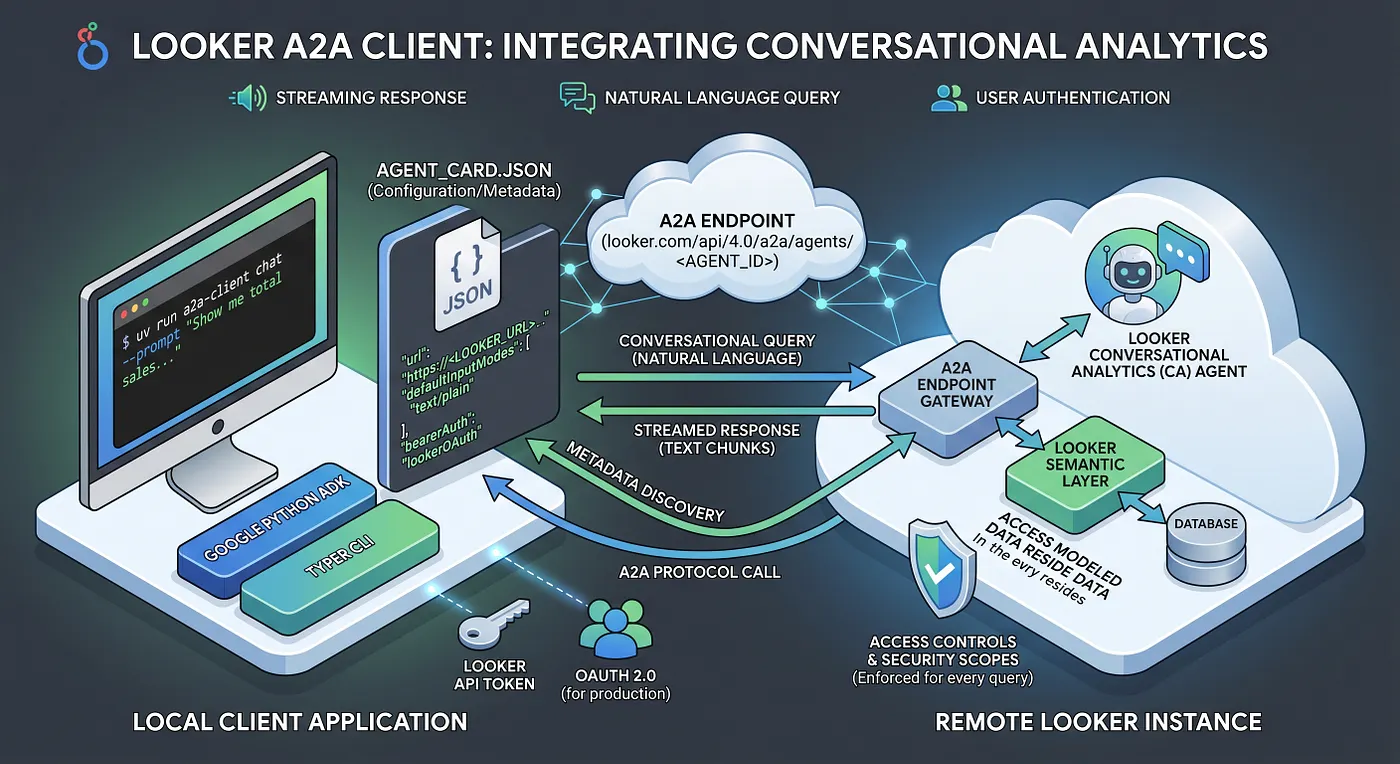
We recently launched an integration for publishing Looker CA Agents to Gemini Enterprise, and behind the scenes, these run as A2A agents pointing directly to a native Looker API endpoint.
If your organization uses a homegrown solution but you still need access to Looker’s Semantic Layer, you can completely skip building custom wrappers from scratch. You can easily reuse the CA Agents already sitting in your Looker instance and talk to them from any client using the A2A protocol and the Google Python ADK.
To make this easier, I’ve put together a sample A2A Client exposed as a CLI for local development. Here’s a quick look at how the underlying architecture breaks down and how you can get it spinning locally.
1. Anatomy of an Agent Card
We use ADK’s Python SDK to connect to a remote Looker A2A Agent. The SDK relies on a structured configuration file called an Agent Card. This JSON file acts as a descriptive profile for the remote agent, mapping out its location, capabilities, and required security layout. Looker’s A2A Agent Endpoint doesn’t natively serve this Agent Card at /.well-known/agent.json so we need to define it in the A2A client.
A standard Agent Card comprises four core structural areas:
- Identity & Endpoint (
name,url): Uniquely identifies the agent and points directly to the Looker instance API path containing your specific Agent UUID. - Capabilities & Modes: Explicitly declares features like
streaming: trueand defines the supported MIME types (such astext/plain) for input and output. - Skills: A descriptive array outlining what the agent can do (e.g.,
conversational_analytics), providing downstream orchestration layers with context about the agent’s utility. - Security Schemes: Outlines how the client must prove its identity. For rapid prototyping or backend scripting, this is typically configured to expect a standard HTTP Bearer token.
2. Decoupling the ADK Client Logic
The execution pipeline inside the application code leverages ADK constructs to handle the translation between raw user text and streamed Looker responses. Instead of wrestling with low-level JSON-RPC protocol details, the application establishes a clean multi-step pipeline:
- Scoped Transport Layer: An asynchronous
HTTPXclient is initialized and pre-loaded with the necessary Looker authorization headers, ensuring every subsequent network call is securely signed. - Agent Initialization: The ADK’s
RemoteA2aAgentclass consumes the Agent Card profile and standardizes the communication interfaces. - Session & Context Isolation: An ADK in-memory session manager instantiates unique data wrappers (
InvocationContext) to cleanly isolate different user conversations and track conversational history. Note: we use the in-memory session manager for simplicity but in production it is highly recommended to use Gemini Enterprise Agent Platform’s managed service for this. - Stream Execution: The client triggers the remote execution engine, returning an asynchronous generator that yields events as Looker processes the query in real time.
3. Testing the Integration Locally
The fastest way to validate your A2A setup is by spinning up the provided command-line interface tool. This allows you to verify token authorization and ensure Looker can correctly parse your natural language prompts.
Prep Your Environment
Before running the client, duplicate the .env_example file into a local .env file and insert a valid, short-lived Looker API access token:
LOOKER_A2A_TOKEN="your-fetched-bearer-token-here"
Additionally, ensure you have opened your local agent_card.json and swapped out the template placeholders (<LOOKER_URL> and <AGENT_ID>) with your active Looker instance details.
Execute Local Test Queries
With your environment variables locked in, you can interact with the CLI directly. The project natively supports uv for seamless execution without manual dependency management, but standard virtual environments work just as well.
# Option A: Run instantly using uv (Recommended); use --help flag to understand cli command and additional flags
uv run a2a-client chat -- prompt "Show me total sales for last week broken down by geography"

# Option B: Run via a standard Python virtual environment
python3 -m venv .venv
source .venv/bin/activate
pip install -e .
a2a-client chat -- prompt "Show me total sales for last week broken down by geography"
When triggered, the client sets up the secure connection tunnel, sends the prompt, and pipes the streaming text chunks right into your terminal output.
⚠️ Production Security Callout
While using a static developer token via a .env file is perfectly fine for quick local testing, production environments must switch to an OAuth 2.0 flow with PKCE to pass end-user credentials.
When switching to a live deployment, updating your configuration to use agent_card_oauth.json serves strictly for OAuth metadata discovery — it allows the ADK to discover the proper authorization endpoints and required scopes (like cors-api). However, the card itself does not execute the authentication. Your client application is entirely responsible for handling the actual OAuth 2.0 flow, including managing user browser redirects, verifying the PKCE challenges, and executing the backend token exchange.
Once your application successfully retrieves the dynamic user token, it is injected into the ADK runtime. This architecture ensures that end-user credentials are handled securely and that Looker strictly enforces user-specific data access controls and row-level security for every conversational query.